EU Login secure authentication methods
Since 1 July 2025, it is no longer be possible to authenticate in EU Login using a code received by SMS. Here are several possible options - accepted by the European Commission - which can be adapted to the different IT equipment configurations of pensioners but want to install another option (righthand column).
Secure authentication methods
DO YOU HAVE A NEW SMARTPHONE? SETTING UP THE EU Login APP ON YOUR NEW DEVICE
If you have a new smartphone but still have an alternative secure method for logging in, simply follow the “ADD EU LOGIN APP” guide in the right-hand column or click on this link ADD EU LOGIN APP.
If you have a new smartphone and you do NOT have an alternative secure method to log in to the EU Login App, you must follow the NEW SMARTPHONE guide.
HOW ABOUT AN EASIER AND/OR AN ALTERNATIVE WAY TO ACCESS YOUR EU LOGIN?
You no doubt already set up an alternative verification method in connection with the SMS phase-out in 2025, but did you know that there are now easier methods available? It is in any case advisable to have an alternative solution as a back-up)! It may also be useful when you change your equipment one day !
PMO is now offering a whole raft of different methods, some are good for PCs, some for iPads, others for older equipment …there is a solution for everybody!
Check out the selection here:
LIST OF VERIFICATION METHODS (all very safe!):
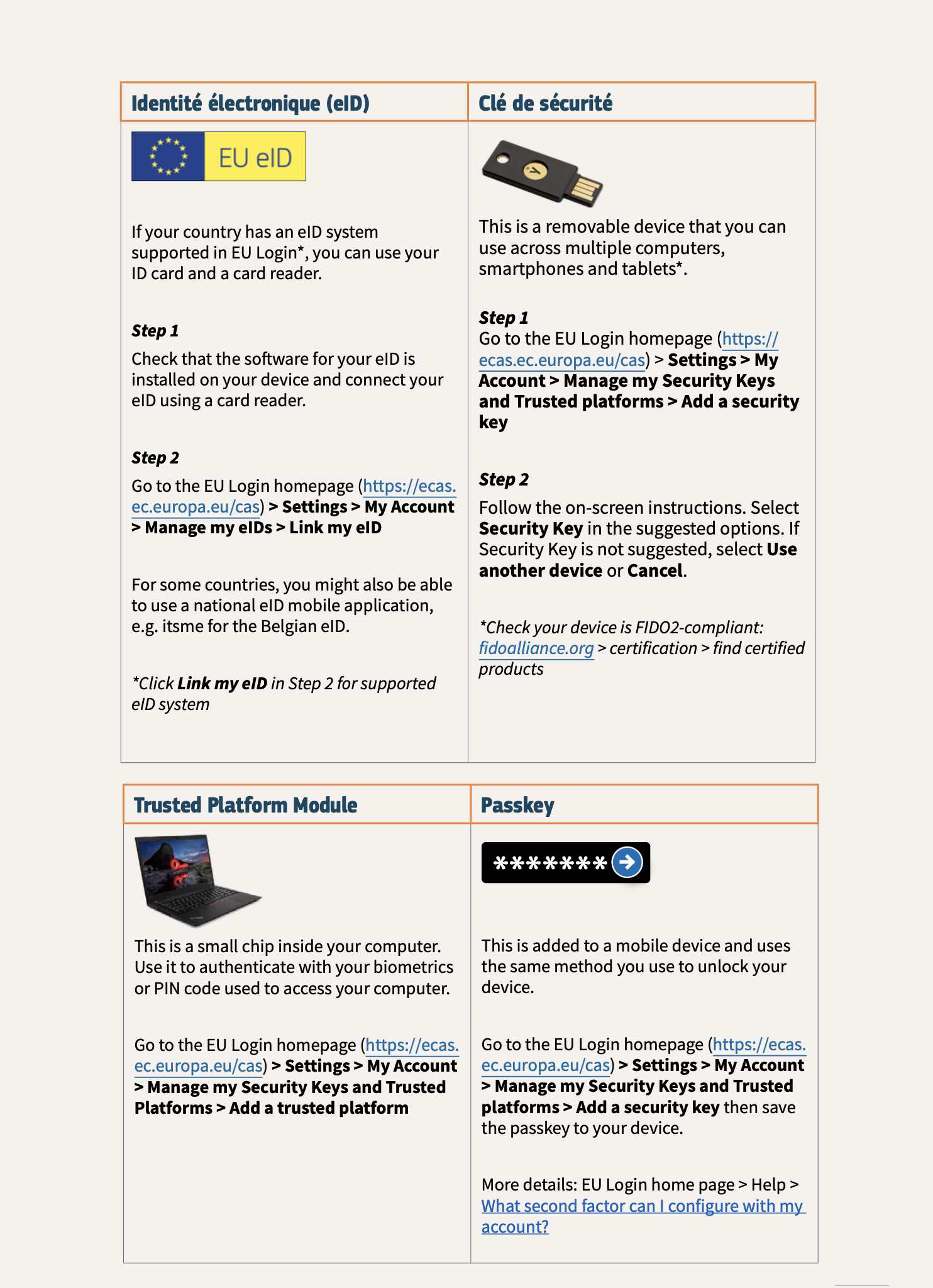
1. Electronic ID (eID), enables you to log in using your national eID system. ADD eID TO EU LOGIN.
-> See Itsme (for Belgium; French guide only) Guide for ItsMe
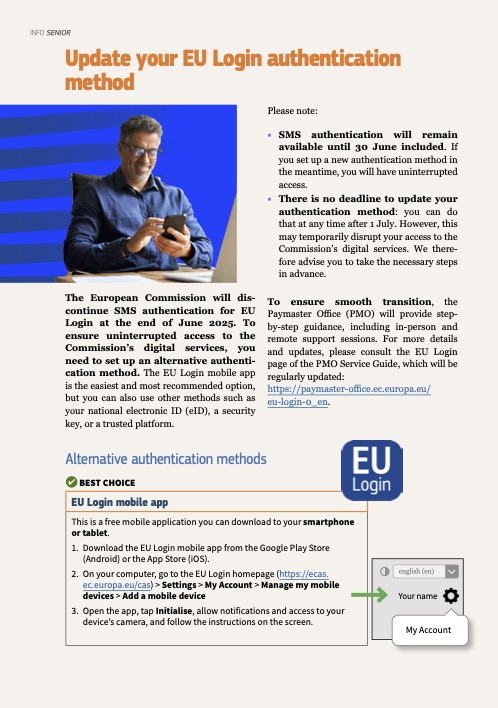
2. EU Login Mobile App is the most common option – easy to use once it has been set up. Ideal for people with older or non-standard equipment. ADD EU LOGIN APP
4. Trusted Platform (TPM), can be activated on all Windows 10/11 computers and on Apple devices not older that 2017-18. It enables very easy log in with just your usual screen lock (biometric or code). ADD A TPM TO EU LOGIN
5. Passkey is equivalent to TPM but designed for mobile devices (iPad/tablet, smartphones). It can be activated on Apple devices not older than 2017-18. ADD PASSKEY TO EU LOGIN
6. Security Key (such as Yubikey, minimum standard FIDO2): a small hardware dongle which you insert into a USB socket of your device. The only solution which is not free of charge. It is portable, so you can safely use it in other people’s computers, hotels etc. – just don’t leave it behind! ACTIVATION OF SECURITY KEY
For these last three methods (3-5) you do NOT require a smartphone, and they can be used for several EU Login accounts (if you also handle the account of your spouse or a close relative, for instance).
It is recommended to activate at least two different verification methods.
For those interested in the more technical aspects, here is a table explaining the last 3 options.
All the guides are available in English, French and Danish under the “Documentation” tab on our website. Just search for the relevant guide by typing the keyword (eID – EU Login app – TPM – Passkey – Security key) into the search field next to the magnifying glass.
Update your EU Login authentication method
Documents and Forms
EU Login secure authentication methods ?
EU Login access always requires a password AND a second authentication factor. Above, you will find a description and guides on how to choose and apply this second factor to your specific device. Also feel free to visit the freely accessible European Commission’s page: https://paymaster-office.ec.europa.eu/eu-login-0_en
AIACE Membership
Need additional help?
- A question about my rights with the Commission?
- A question about the tools of the Commission?
- A question about the services offered by AIACE?
Would you like to become a member ?
Click on the "Register" button below
- Get personalized support with long-term follow-up
- Take part in discussions about the future of the association
- Take part in our events
- Subscribe to our insurance